Storyboard in Web Design: What It Is and How to Create One
A storyboard is a page-by-page blueprint of your site's layout, content and user flow — mapped before design begins. Here's how to create one.

Shaheer Malik
Framer Designer & Developer
Quick answer
A web design storyboard is a page-by-page blueprint mapping each screen's purpose, content and the visitor's route through the site, made before any design work starts. It surfaces missing content and unjustified pages while they still cost minutes to fix, rather than days after the design is signed off.
A storyboard in web design is a visual, page-by-page blueprint of a website’s layout, content and user flow, mapped out before design begins. It shows what each screen contains and how visitors move between them — aligning designers, developers and clients, and catching structural problems early, while they’re cheap to fix. This guide explains what a web design storyboard is, why you need one, and exactly how to create one step by step, with examples, tools and common mistakes to avoid.
What is a Storyboard in Web Design?
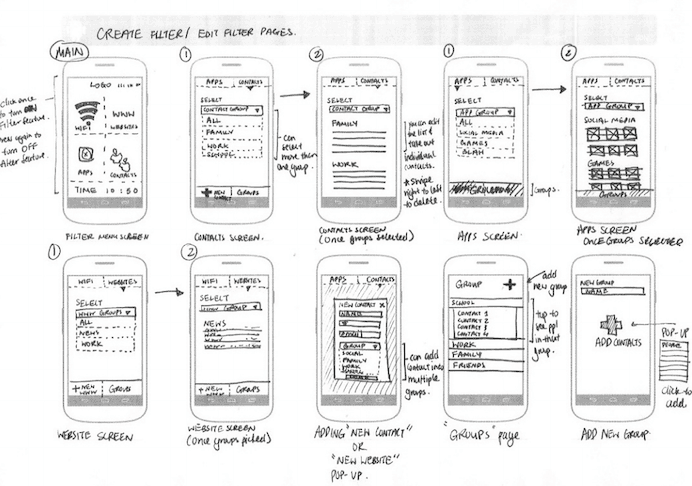
A storyboard in web design is a visual representation of a website’s structure, template, layout, and content. It serves as a blueprint, outlining how each page will look and function. Storyboards can be created using rough sketches or sophisticated digital tools, and they help web designers visualize the user journeys they aim to create.
For example, storyboard templates might include a basic layout of the homepage, with placeholders for key elements like the header, footer, navigation menu, and main content areas. It also illustrates the flow from one page to another, ensuring that the user experience is seamless and intuitive.
Why Do You Need a Storyboard for Your Website?
Creating a storyboard is a crucial step in the web design process for several reasons:
Alignment and Clarity: A storyboard ensures that all stakeholders have a clear understanding of what the final website will look like. It helps align the design team, developers, and clients on the project's vision and objectives.
Identifying Potential Issues: By visualizing the website's layout and user flow early in the design process, you can identify and address potential issues before they become costly problems during development.
Efficient Design Process: A well-crafted storyboard can save time and effort by providing a clear roadmap for the design and development phases. It helps avoid unnecessary revisions and ensures that the project stays on track.
Key Elements of a Website Storyboard
A comprehensive website storyboard should include the following elements:
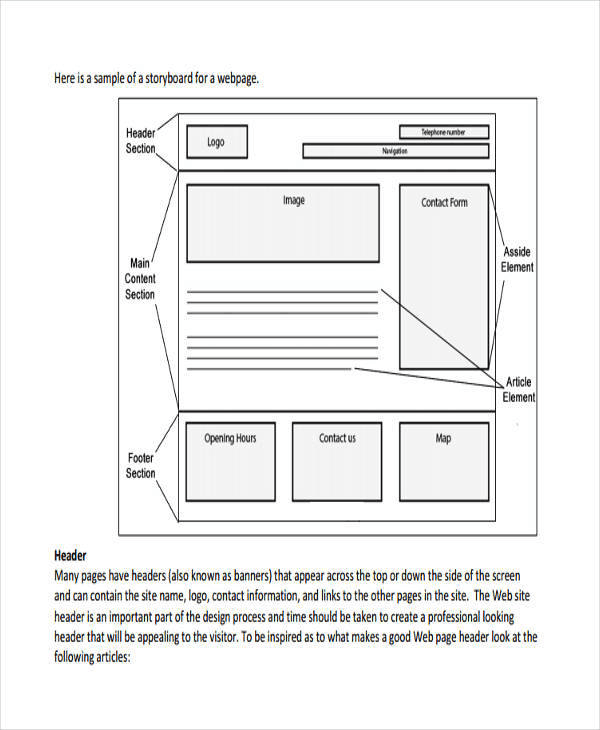
Format: The basic format of the website design, including the overall structure and layout. This foundational format sets the stage for more detailed design work.
Wireframe: A wireframe is a simple sketch outlining the positioning of key design elements such as the search bar, navigation menu, content sections, and call-to-action buttons. Wireframes help organize the website's layout and core functionalities.
UX Elements: This section focuses on user interactions and behavior. It outlines how different sections of the website will respond to user actions, ensuring an intuitive and seamless user experience.
Content: While the storyboard won’t include actual content, it should define where content will be placed and how much space it will occupy. This helps ensure that the design accommodates all necessary information.
How to Create a Storyboard for Your Website
Creating a storyboard involves several steps, each aimed at refining the website's design and functionality:
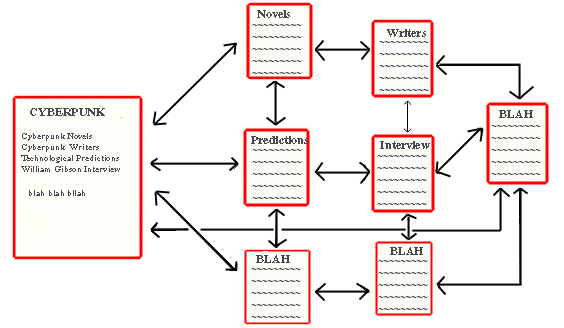
Conceptual Planning: Develop a basic layout and determine the type of content and key design elements for the site. This initial planning sets the direction for the storyboard.
Mockup Sketches: Draw mockup sketches of different web pages, including essential graphical elements typically found on those pages. These sketches provide a rough visual representation of the website.
Detailed Wireframes: Create detailed wireframes that outline the structure and flow of each page. These wireframes should be interactive, allowing you to click through and experience the navigation as a user would.
Review and Revise: Share the storyboard with your team and gather feedback. Make necessary revisions to ensure that the design aligns with business goals and user needs.
Storyboarding in Web Design: Best Practices
To create an effective storyboard, follow these best practices:
Keep It Simple: The storyboard should be easy to understand, featuring clear and concise visuals. Avoid unnecessary complexity that can confuse stakeholders.
Focus on User Experience: Prioritize the user journey and ensure that the storyboard reflects an intuitive and seamless navigation experience. Think about how users will interact with each element on the page.
Incorporate Feedback: Continuously seek feedback from team members and stakeholders. Use this input to refine the storyboard and ensure it meets everyone's expectations.
Use Real Content When Possible: While placeholders are useful, incorporating real content early can help identify layout issues and ensure the design accommodates all necessary information.
How to Collaborate Effectively with Your Web Design Team
Collaboration is key to a successful web design project. Here are some tips for effective teamwork:

Regular Meetings: Hold regular meetings to discuss progress, address issues, and ensure everyone is on the same page. This keeps the project on track and fosters a collaborative environment.
Clear Communication: Use clear and concise communication to convey ideas and feedback. Visual aids like storyboards can help illustrate concepts more effectively.
Assign Roles and Responsibilities: Clearly define each team member's role and responsibilities. This ensures accountability and helps streamline the design process.
Examples of Successful Website Storyboards
Looking at successful storyboard examples can provide valuable insights and inspiration. These website storyboard examples give you an idea to create effective structure and design.
CityFibre: CityFibre used embedded video and full-screen photos to make the topic of internet infrastructure more engaging. Their storyboard included visual brand stories that enhanced user interaction and personalization.
Sky News: Sky News used infographics to simplify the complex concept of Brexit’s impact on the UK economy. Their storyboard detailed the placement and design of these infographics to ensure clarity and engagement.
El Periódico: El Periódico used custom illustrations to depict the space race between Elon Musk and Jeff Bezos. Their storyboard integrated these illustrations to create an immersive user experience.
Tools and Software for Creating Storyboards
There are various tools and storyboarding softwares available to help you create detailed and interactive storyboards. Many free digital online storyboard creator tools are also available on internet or you can download your storyboard tool you're looking for.

Figma: A popular design tool that allows for collaborative wireframing and prototyping. Figma is great for creating interactive storyboards that team members can easily share and edit.
Adobe XD: Another powerful tool for UX/UI design, Adobe XD provides robust features for wireframing, prototyping, and sharing storyboards.
Sketch: A vector-based design tool that is widely used for creating wireframes and storyboards. Sketch integrates well with other design tools and plugins, enhancing its functionality.
The Role of Storyboarding in UX Design
Storyboard can help in UX design by providing a visual narrative of the user journey. Here’s how it contributes to a better user experience:
Visual Representation: Storyboards offer a visual representation of how users will interact with the website. This helps identify potential pain points and areas for improvement early in the design process.
User Flow: By mapping out the user flow, storyboards ensure that the navigation is intuitive and that users can easily find what they need. Moreover it enhances the website design process by ensuring a good flow of website’s pages and sections.
Alignment: Storyboards help align the design team and stakeholders on the project’s goals and objectives, ensuring that the final product meets user needs and business requirements.
Common Mistakes to Avoid When Storyboarding
Avoid these common mistakes to ensure your storyboard is effective:
Overcomplicating the Design: Keep the storyboard simple and focused. Avoid adding too many details that can overwhelm stakeholders and obscure the main objectives. Must adhere to design principles for creating a visual.
Ignoring Feedback: Failing to incorporate feedback from team members and stakeholders can lead to misalignment and a final product that doesn’t meet expectations.
Skipping the Review Process: Always review and revise the storyboard before moving forward. This helps catch potential issues and ensures that the design is on the right track.
A website storyboard template you can copy
Most storyboard guides stop at theory. Here is the actual structure I use on client projects — one row per screen, filled in before any design work starts.
| Field | What goes in it | Example (SaaS homepage) |
|---|---|---|
| Screen | Page name and URL | Homepage — / |
| Goal | The one thing this screen must achieve | Get the visitor to start a free trial |
| Audience state | What they know when they arrive | Arrived from a comparison article; knows the category, not the product |
| Sections | Blocks in order, top to bottom | Hero → logos → problem → 3 features → pricing → FAQ → CTA |
| Key message | The sentence they should remember | Ship a production site in a week, not a quarter |
| Primary action | The main button and where it goes | Start free trial → /signup |
| Next screen | Where they go after | /signup, or /pricing if still comparing |
| Assets needed | Copy, images, video, data | 6 client logos, product screenshot, 3 testimonials |
Fill one of these in for every page before opening a design tool. Two things happen: you find the pages nobody can justify, and you find the content nobody has written yet — both far cheaper to fix at this stage than after design.
A worked example: storyboarding a 5-page site
Here is the same template applied across a small marketing site, showing how the flow connects rather than treating each page in isolation.
- Homepage — goal: qualify and route. Sections: hero, social proof, problem, outcome, three paths (product, pricing, work). Exit: whichever path matches intent.
- Product — goal: prove it does the job. Sections: core feature walkthrough, screenshots, integrations, objection-handling FAQ. Exit: pricing.
- Pricing — goal: remove cost uncertainty. Sections: tiers, what's included, FAQ on billing. Exit: signup or contact.
- Case studies — goal: de-risk the decision. Sections: results first, then process. Exit: contact.
- Contact — goal: make the ask trivially easy. Sections: short form, direct email, calendar link. Exit: booked call.
Notice that every screen names its exit. A storyboard that doesn't connect screens is just a list of pages — the flow is the entire point, and it's what a wireframe alone won't give you.
Storyboard vs wireframe vs sitemap
These three get used interchangeably and they solve different problems:
- Sitemap — what pages exist and how they nest. Structure only, no content.
- Storyboard — what each screen must achieve, what it contains, and where the visitor goes next. Intent and flow.
- Wireframe — where elements sit on the page. Layout and hierarchy, no visual design.
The useful order is sitemap, then storyboard, then wireframe. Skipping the storyboard is why so many wireframes end up as beautifully arranged boxes that don't move anyone toward a decision.
Conclusion
In summary, creating an effective website storyboard is crucial for a successful web design project. Here are the key takeaways:
Understand the importance of a storyboard in web design: Storyboard is a blueprint. It provides a visual blueprint and ensures alignment among all stakeholders.
Include key elements in your storyboard: Format, wireframes, UX elements, and content placement are essential components.
Follow best practices: Keep the storyboard simple, focus on user experience, incorporate feedback, and use real content when possible.
Collaborate effectively: Hold regular meetings, communicate clearly, and define roles and responsibilities.
Learn from successful examples: Look at how other websites have used storyboards to enhance their design process.
Use the right tools: Tools like Figma, Adobe XD, and Sketch can help create detailed and interactive storyboards.
Avoid common mistakes: Don’t overcomplicate the design, ignore feedback, or skip the review process.
By following these guidelines and utilizing the right tools, you can create storyboards that streamline the web design process, leading to more intuitive and engaging websites. Storyboarding is an invaluable part of web design that helps visualize the end product, ensuring a successful outcome for your web project.
FAQ
Frequently asked questions
A web design storyboard is a visual, panel-by-panel outline of a website's pages and user flow before design begins. It maps what each screen contains and how users move between them — a blueprint that aligns the team and prevents expensive rework later.
Want it done for you? I offer website design on a fixed price, from $700. See pricing.